

You will have seen this on LinkedIn or other social media: people give ChatGPT or another LLM something fairly basic — counting r’s in ‘strawberry’, for example; a recent one was about walking or driving to a nearby car wash — which it then gets wrong, and people laugh at how dumb AI is.
On one hand these stupid things are a useful reminder; on the other hand, they’re performative catering to confirmation bias.
They weren’t wrong about the output; the AI did fail.
Or, rather, their AI failed.
As a result, they are wrong about what think they demonstrate. They’d only tested their particular configuration of AI — which, based on most of the screenshots, are free-tier models with no customisation, no context, and no instructions beyond a single prompt typed into a chat box.
That’s a bit like test-driving a bicycle, concluding that vehicles can’t exceed 25 km/h, and proceeding to laugh at people who think they can drive to Sydney in a day.
I see this constantly, from both sides.
The enthusiasts running agentic frameworks and custom workflows who can’t understand why everyone else doesn’t see it.
And the skeptics who dismiss it entirely are usually running the default models.
At least sometimes, they’re both reporting their experiences honestly. But they’re not talking about the same thing, so they talk past each other, and irrespective of that, things are a little bit more complicated than either end would want you to believe.
This is the problem I want to dig into today, because it has consequences that go well beyond social media arguments. When organisations make decisions about AI strategy — how much to invest, where to deploy it, what it can and can’t do — those decisions are shaped by the experiences of the people in the room. And since those experiences vary so wildly, depending on how the tool is configured, most statements about “what AI can do” are essentially meaningless without specifying the setup in great detail.
The answer to almost every question about AI capability is “it depends.”
The Six Layers
To make this concrete, let me walk through a single, common task and show how the output transforms as you move through six layers of configuration.
Note: I am not going to touch on experimental agents or frameworks like OpenClaw here. In my judgement, they’re not ready to be used by ‘normal’ people. What I have are six layers that are ready for prime-time - doesn’t mean it’ll always be only six layers.
But first, a note about something that cuts across every layer: how you prompt matters. The quality of what you ask — how specific you are, how much context you provide, whether you iterate on the first answer or accept it — affects the output at every level.
A thoughtful, detailed prompt at Layer 1 will outperform a lazy one-liner at Layer 3. Prompting is still a skill and it’s the one variable that compounds with everything else. I’ll come back to this, but keep it in mind as we go.
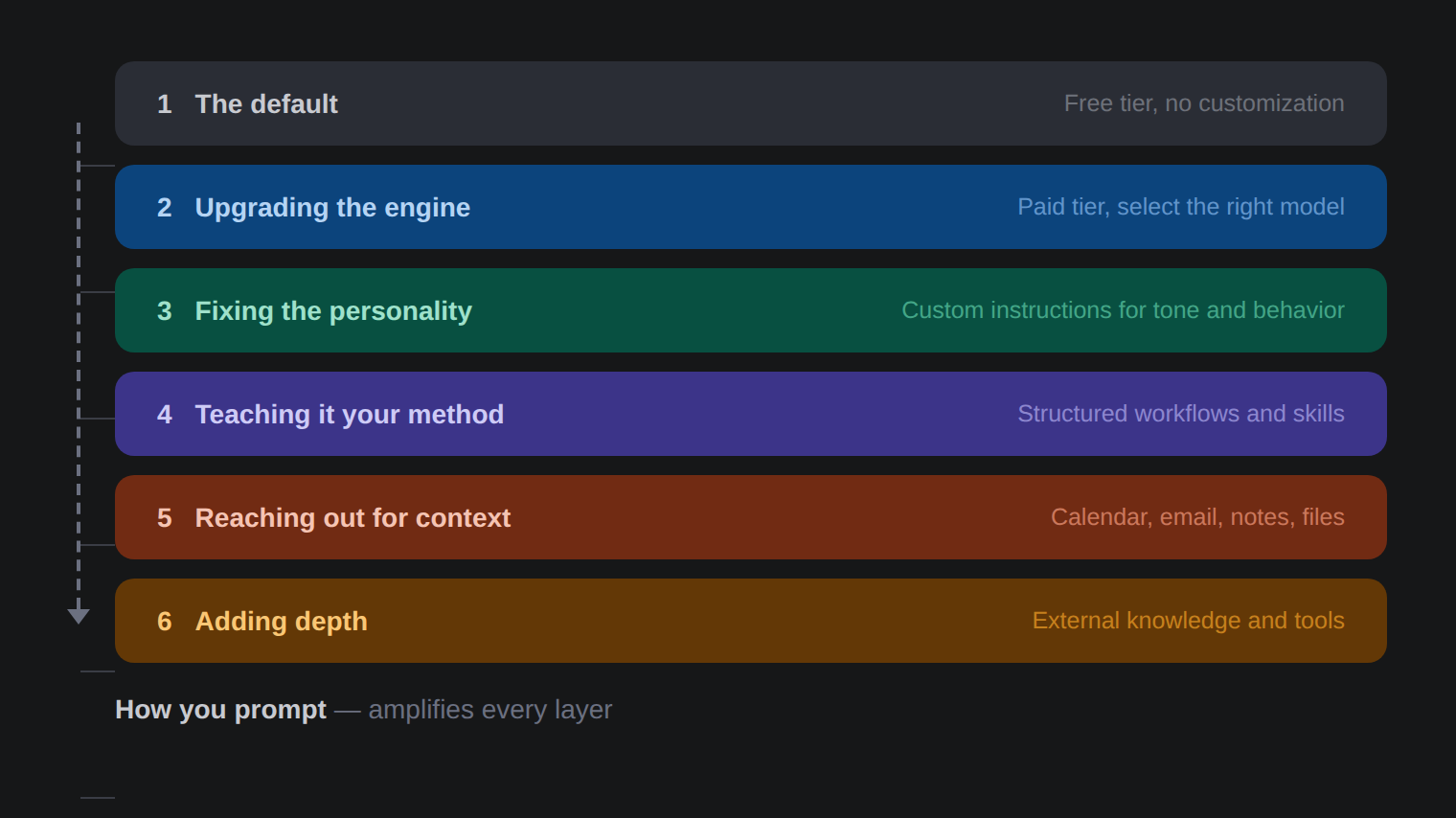
Layer 1: The Default
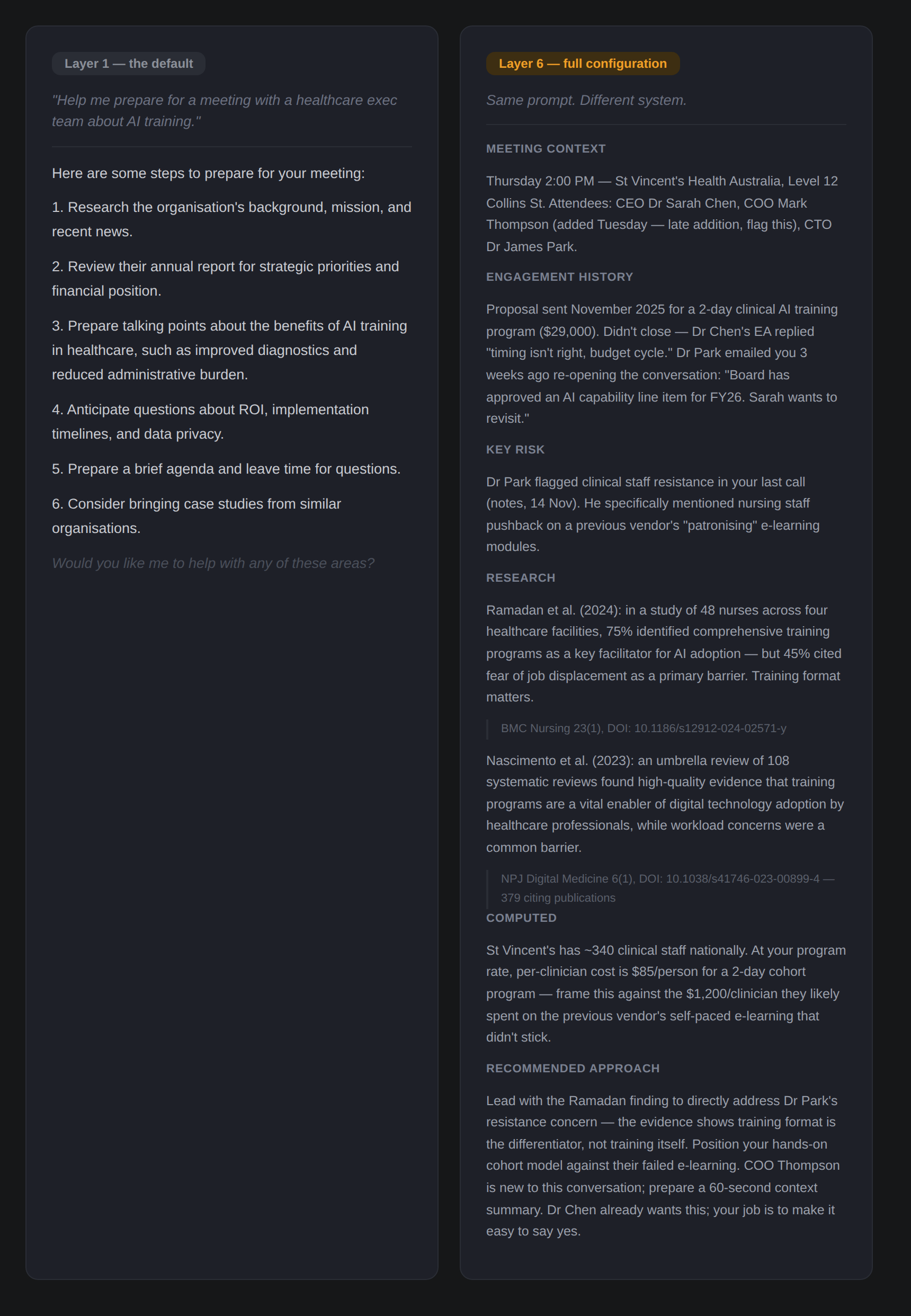
This is where most people’s experience begins and ends. You go to ChatGPT or whatever tool your organisation provides. You type something like: “Help me prepare for a meeting with a healthcare exec team about AI training.”
You get back… advice. Fine, generic, sensible, forgettable advice. Research the company. Review their annual report. Prepare an agenda. Think about what questions they might ask.
Duh.
It’s not that it’s wrong, it’s just not very useful if you’re not a complete newbie into the world of business. You could have found the same suggestions in any business article written in the last thirty years. The AI doesn’t know who you are, who the client is, what your expertise is, or what you’re trying to achieve. It’s working with nothing but your twelve-word prompt and whatever statistical patterns it learned during training.
(This is where prompting skill matters most, by the way. At Layer 1, it’s all you’ve got. A detailed, context-rich prompt — explaining your role, the client’s background, the meeting’s purpose — would already produce a noticeably better result. But most people never try this, because their frame of mind is in testing the tool, not actually using it.)
This is the experience that produces most of the skepticism. And honestly? The skepticism is fair — for this level and this configuration.
The mistake is assuming this is all there is.
Layer 2: Upgrading the Engine
The simplest improvement is one that a surprising number of people still don’t know about: paying for the tool and selecting the best model.
Every major AI platform offers multiple models. Some are faster but less capable. Some are specifically designed for complex reasoning — often called “thinking” or “reasoning” models — that will actually work through a problem more in a step by step manner before answering. In most cases, this is extremely helpful.
In all the three frontier tools (Claude, ChatGPT, and Gemini), you can select different models from a dropdown menu. Most people have never clicked that dropdown. Many don’t know it exists, and others don’t think it matters. I don’t blame them; the labs have traditionally, in technical terms, sucked at the UX of this and the model naming has been less than helpful to be charitable.
The paid tier also typically means a larger context window (the AI can hold more information in its head at once), access to better models, and fewer restrictions on usage.
Same meeting prep prompt, better model: you now get a more structured analysis, perhaps some industry-specific considerations for healthcare AI adoption, a more nuanced discussion of stakeholder dynamics. It’s noticeably better. But it’s still generic, because the AI still doesn’t know anything about you.
Layer 3: Fixing the Personality
This is where most people leave enormous value on the table.
Every major AI platform lets you set custom instructions — persistent context that the AI reads before every conversation. Most people either don’t know this exists or have written something vague like “be concise and professional.”
But custom instructions can do far more than set a tone. You can tell the AI who you are, what you do, how you think, what you value, and how you want to work together. You can tell it to challenge your assumptions rather than validate them. You can tell it to match your communication style, understand your industry context, and skip the generic preamble.
The difference this makes is profound and underappreciated. With well-crafted instructions, the AI stops being a generic assistant and starts being your assistant. It frames meeting prep through your professional lens. It knows you’re a consultant, not an employee. It knows your approach to client relationships. It adjusts its depth and tone to what you actually need rather than what an average user might want.
The default behaviour isn’t neutral, but rather calibrated for the widest possible audience, which means it’s optimised for no one in particular, and quite often for engagement and not being offensive. Fixing the personality is fixing a misalignment that most people either don’t notice or are actively pissed off about (like the models being sycophantic), but don’t realise how easy it is to fix.
Layer 4: Teaching It Your Method
Here’s where it gets more interesting. Custom instructions can tell the AI who you are. But skills — reusable structured workflows — tell the AI how you want specific types of work done.
Think of the difference between hiring someone smart and hiring someone smart who’s been trained in your methodology. Skills are what I used liberally in my exploration of using GenAI for foresight that I talked about in the Futures Dramaturg article.
A skill for your client meeting preparation might include a specific structure: stakeholder mapping, engagement history review, risk and opportunity identification, industry context, and a pre-drafted agenda with discussion prompts. Every time you run it, the output follows your process rather than improvising a new approach each time.
This matters because consistency is where compounding efficiency lives. A one-off clever answer is nice. A repeatable workflow (or, better, an automatically reporting workflow) that produces reliably excellent prep for every meeting, every time, following your standards — that changes how you operate.
Most AI users are improvising every interaction from scratch, so quite naturally they’re getting different formats, different depths, different structures each time. Skills reduce that variance. You design the process once, and then it gets executed.
Layer 5: Reaching Out for Context
Up to Layer 4, the AI is working with your instructions and whatever you type into the prompt. It’s smart, it knows stuff about you and is personalised, it has your methodology, but it’s still essentially imagining the situation based on what you tell it.
At Layer 5, the AI connects directly to your data: Your calendar. Your email. Your notes. Your files.
For our meeting prep example: instead of asking you who the meeting is with and when it’s happening, the system reads your calendar and knows. It searches your email for recent exchanges with this client. It checks your notes for the history of the engagement — what you proposed, what they said, what’s outstanding. It finds the proposal you sent them three months ago and the follow-up that went unanswered.
The brief it produces isn’t then based on generic advice or even your methodology alone. It’s grounded in actual information about this specific meeting with this specific client. Things you might have forgotten or never thought to mention, or that simply would’ve been a lot of work to manually add.
This is the layer that makes most of the “AI can’t do real work” crowd look like they’ve been reviewing a different product entirely, because they have been.
Layer 6: Adding Depth
The final layer I will be talking about here extends the AI’s reach beyond your personal data to external knowledge sources — academic databases, computational tools, verified research, real-time data.
For the meeting prep: the AI now searches peer-reviewed literature on the topics you’ll be discussing. It pulls current industry reports and regulatory updates relevant to the client’s sector. It can compute financial projections or model scenarios if the meeting involves quantitative decisions. It accesses specialised databases that you’d normally need to search manually — or more likely, wouldn’t search at all because you didn’t have the time.
As a result, you walk into the meeting with knowledge that neither you nor the AI had in isolation. You’ve been augmented in the truest sense — not replaced, not automated, but operating with a depth and breadth of preparation that simply wasn’t possible before.
This is what advanced AI use actually looks like today.
The Branching Problem
So here’s where this connects to the broader challenge, and where it gets worse than a simple ladder model might suggest.
The six layers describe form the vertical differences in what people have and use, but there’s a horizontal one too. Even two people operating at the same layer will have fundamentally different experiences, because every choice they’ve made along the way creates divergence.
At Layer 3, your custom instructions are different from mine. You’ve told your AI to be formal and cautious; I’ve told mine to challenge my thinking and skip the preamble. Ergo, different tool. At Layer 5, you’ve connected your Outlook calendar and SharePoint; I’ve connected Gmail, Obsidian, and a CRM, so we get different universes of context. At Layer 6, you might be pulling from a legal database; I’m pulling from peer-reviewed academic research and computational tools. Completely different intelligences that excel, and fail, at different things.
The result is a tree.

Every configuration choice is a branching point. Model selection, custom instructions, which skills you build, which data you connect, which external tools you integrate, and underneath all of it how well you prompt. The further you go, the more branches there are, and the more personal the tool becomes. Two people at Layer 6 might be running systems so different from each other that comparing their experiences is barely more meaningful than comparing one person’s Layer 1 to another’s Layer 6.
This is why “what AI can do” is becoming a nearly meaningless question.
It’s like asking “what can software do?” The answer depends entirely on which software, configured how, by whom, for what purpose. We don’t ask that question about software because we intuitively understand the space is too vast. We haven’t yet developed that intuition for AI, but we need to, quickly, because the decisions being made in its absence are consequential.
When a CEO tells their board “we’ve tried AI and it’s not that impressive,” what were they running? What layer? What configuration? What instructions? What connections?
Was it stock-standard Copilot?
When a consulting firm says “AI saves our team ten hours a week,” what does their tree look like?
When LinkedIn’s main character of the day dunks on a chatbot for getting a maths problem wrong, which branch were they even on?
The answer matters enormously.
We’re in a moment where organisations are making consequential decisions about AI based on experiences that span a staggeringly wide range of capability, and the people making those decisions usually don’t fully understand the range that exists. They think their experience is the experience. It isn’t. It’s their experience of their configuration - one branch, or leaf, of an enormous tree.
In aviation, mode confusion — where pilots misidentify or lose track of what mode the aircraft automation is in — can lead to automation surprise, where pilots are startled by unexpected automated behaviour.
The AI equivalent is happening right now at an organisational level. People are surprised by AI’s limitations or capabilities because they don’t understand what configuration they’re looking at.
The LinkedIn dunkers are the most visible symptom, but they’re not the real problem. The real problem is the executive who used the default for twenty minutes, formed a confident opinion, and is now shaping their organisation’s AI strategy based on the experience of seeing one fallen twig from a giant tree.
What To Do About It
One caveat before the practical advice: the point of understanding these layers is not that higher is always better. Warren Vanderburgh’s original Children of the Magenta thesis — the one this Substack is named after — makes the strong case that pilots need to know when to reduce automation.
The same applies here. There are moments when you should deliberately drop down a layer or more: when the AI’s context connections are pulling in noise instead of signal, when you need your own unfiltered thinking before the AI shapes it, when a simple prompt to a clean model will give you a better answer than a complex workflow that’s optimising for the wrong question.
Knowing your way around all six layers means knowing which one to reach for in any given moment, including Layer 0 of no AI whatsoever.
If you’ve read this far and suspect you might be operating at a lower layer than you could be, here’s the honest answer: moving up is not trivial. Each layer requires some combination of investment, configuration, and, importantly, a shift in how you think about the tool.
But you can start immediately:
If you’re at Layer 1, the single highest-impact move is upgrading to a paid tier and spending five minutes learning which model to select for which task. That alone will change your experience more than anything else.
If you’re at Layer 2, write proper custom instructions. Not “be concise.” Tell the AI who you are, what you do, how you think, and what you expect. Spend an hour on this. It pays for itself in the first week.
If you’re at Layer 3, start thinking about the tasks you do repeatedly and whether you can structure them into consistent workflows. This requires more thought than the previous layers, but the leverage is big.
If you’re at Layer 4 and beyond, you’re already way ahead of most. The returns from here come from deeper integration; connecting more data sources, adding specialised external tools (many of which, yes, you will need to pay for), and refining your workflows as you discover what actually saves you time versus what’s merely impressive. Keep experimenting. The frontier moves fast, and at this level, you’re well-positioned to see it first.
The point isn’t to make everyone a Layer 6 user. The point is to make sure that when you form an opinion about what AI can and can’t do, you know which branch you’re standing on, and can calibrate accordingly.
If you’re making decisions that affect your organisation, your team, or your career, you should probably explore a few more branches before you decide what you think of the view.
If you’re a senior leader who wants to move beyond Layer 1-2, I run a bespoke GenAI coaching programs designed to get you to the level where AI actually transforms how you work, not just how you talk about it in your exec or board meetings. Book a free initial call here to discuss.
Good to be reminded that many are still just using the chat interface for quick answers!
Like the framing, will definitely use a variant in my work. We experimental enthusiasts help others most by sharing concrete examples of prompts and outcomes across the different layers, not just 'showing-off' final results. The interesting part is what you put in, when, and how you correct during the full process.
The branching tree is how I work currently: deliberately forking to create different results and expand possibilities. Exploring alternatives relatively fast and cheap, that for me is the true current value of AI. The danger is that you keep on exploring for ever..
Prompting techniques to push AI outside standard answers is something we need to spread more. Just came across this Harvard article you may like: https://gking.harvard.edu/quest
This is one of the most useful explanations I’ve read Sami. Thank you 🙏